

The plan page
The plan page is where prices live. A plan with no price cannot be subscribed to, and this is where you add them.
What this screen is
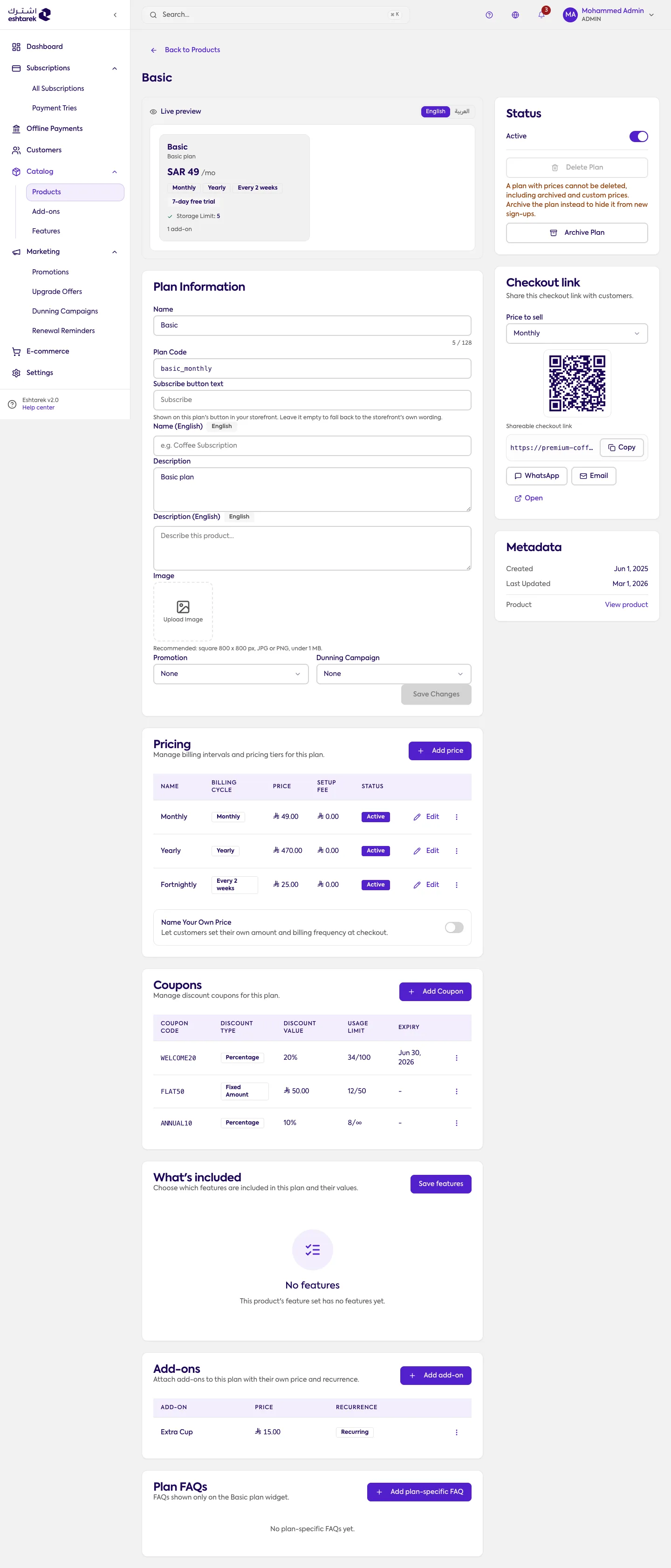
Section titled “What this screen is”A plan is a tier inside a product, such as “Basic” or “Premium”. You open it from the Plans and prices tab in Product settings.
At the top, a live preview shows the plan card as your customer sees it, and you can switch it between Arabic and English.
The sections
Section titled “The sections”Plan information: the name, the plan code, the subscribe button text shown on the card, the description and the image. Name and description each have an optional English field. From here you also attach the plan to a promotion or a follow-up campaign.
Status: an active switch, archive plan and delete plan. Deleting is refused on a plan that has prices, including archived and custom ones; archiving is the alternative and hides the plan from new subscriptions.
Checkout link: the link belongs to each price, not to the plan. You pick the price to sell and the link and QR code change with it, then copy it or send it by WhatsApp or email.
Pricing: the plan’s prices, each an independent billing option your customer chooses. Name Your Own Price hands the amount and the billing frequency to the customer at checkout.
When you add a price you fill three fields only: the price, the unit (day, week, month or year) and the duration. The last two make the billing frequency: month and 1 gives monthly, month and 3 gives quarterly.
Under more options you will find:
- Display label: optional, replaces the tier heading at checkout.
- Billing duration: forever, or a fixed number of cycles and then it stops.
- Setup fee: a one-time amount charged with the first payment.
- Deliver on a different schedule? for delivering independently of billing. Leave the number of deliveries empty to deliver once per billing cycle.
Coupons, what it includes, add-ons and plan questions: this plan’s discounts, its feature values, the add-ons available with it and their price and recurrence, and questions specific to it.
What happens after you save
Section titled “What happens after you save”As soon as an active price exists, the plan can be subscribed to and gets a checkout link per price. See going live.
A price with active subscriptions is partly locked: the billing duration and frequency cannot change, while the amount and setup fee stay editable. The delivery schedule locks once subscriptions start too.
If something goes wrong
Section titled “If something goes wrong”- You cannot find where to add a price: the Add price button is in the pricing section.
- Delete plan is unavailable: the plan has prices. The reason is under the button, and archiving is the alternative.
- The checkout link points at the wrong price: switch the price to sell first; the link follows the price.
- You cannot change the billing cycle: the price has active subscriptions.